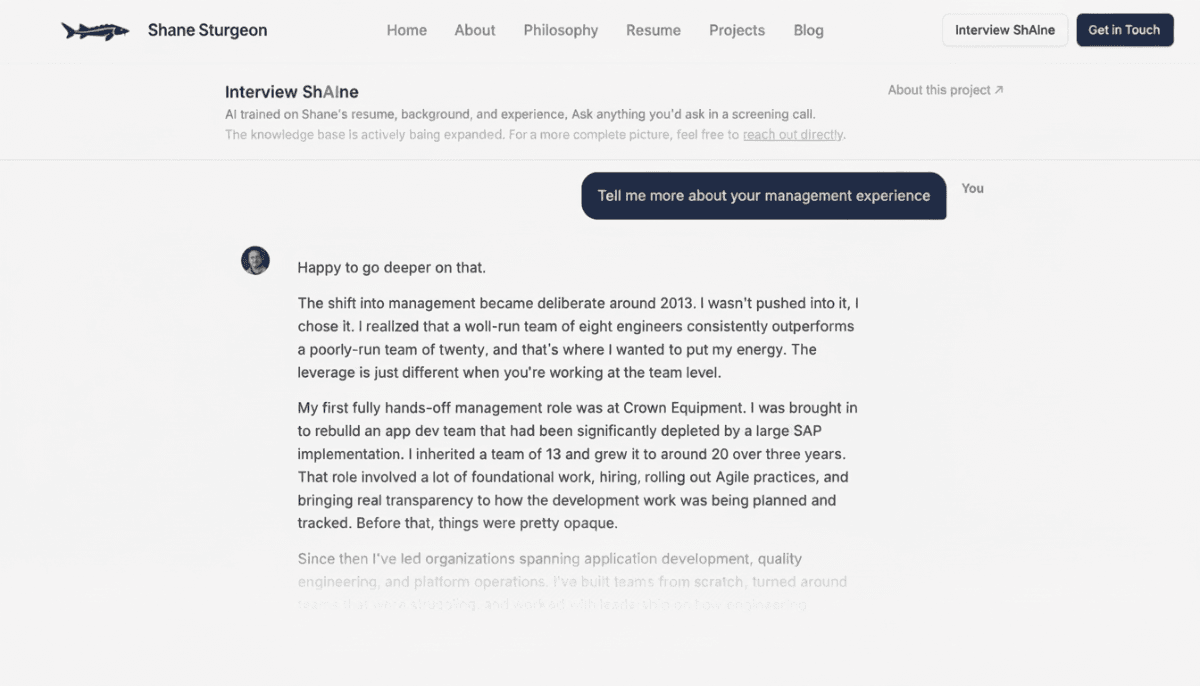
If you read the first post in this series, you have the background on why I built this tool and the challenges I ran into. This post covers the how: the pipeline design, tools chosen and technical decisions made along the way. And I'll finish with some things I might do differently and some potential improvements.
That first post covered both the AI chat and the JD Fit tool, but I'll focus on the chatbot here. The JD Fit Analyzer runs against the same corpus but the development path is different enough to warrant its own post (that's next).
The pipeline in plain English
The architecture is a classic RAG (Retrieval-Augmented Generation) setup. RAG is a framework that improves AI accuracy by retrieving relevant external data before generating a response, rather than relying purely on what the model was trained on. In plain terms: instead of asking "what do you know about Shane?", the system first searches a database of things I've written about myself, pulls the most relevant pieces and hands those to the model along with the question. The model responds using that retrieved context as its source of truth. Less hallucination, more accuracy, fully rooted in my actual background.
RAG Tools and Definitions
Before we get into the details, let's cover the products and services we used along with some definitions that'll make understanding the architecture a bit easier. For those already familiar with AI/RAG terms, you can skip forward to the next section.
The driving forces behind these tool selections were speed-to-market and price. I could stand up the same thing in AWS services but it would be a bit more expensive and take a bit more configuration. I might eventually migrate just to have all my infrastructure in one place, but for this proof-of-concept I was really focused on speed of launch.
First the stack:
- Neon - Essentially Postgres (PostgreSQL) as a Service.
- pgvector - An extension to Postgres that adds specialized capabilities to handle vector data. It transforms Postgres from a row-column database into a "vector database" (more on vectors below).
- Voyage AI - This is our "embedding" (data -> vectors) engine - it takes the corpus documents and embeds them as source content (documents) and it takes the questions from the Interviewer and embeds them as queries.
- Claude Sonnet - This comes in at the very end of the pipeline, after Voyage has already done the retrieval work, and returns the response to the user.
In the sections that follow I'll elaborate on the stack above with a deeper description of the roles they play and how they interact to deliver the service.
The Pipeline overview
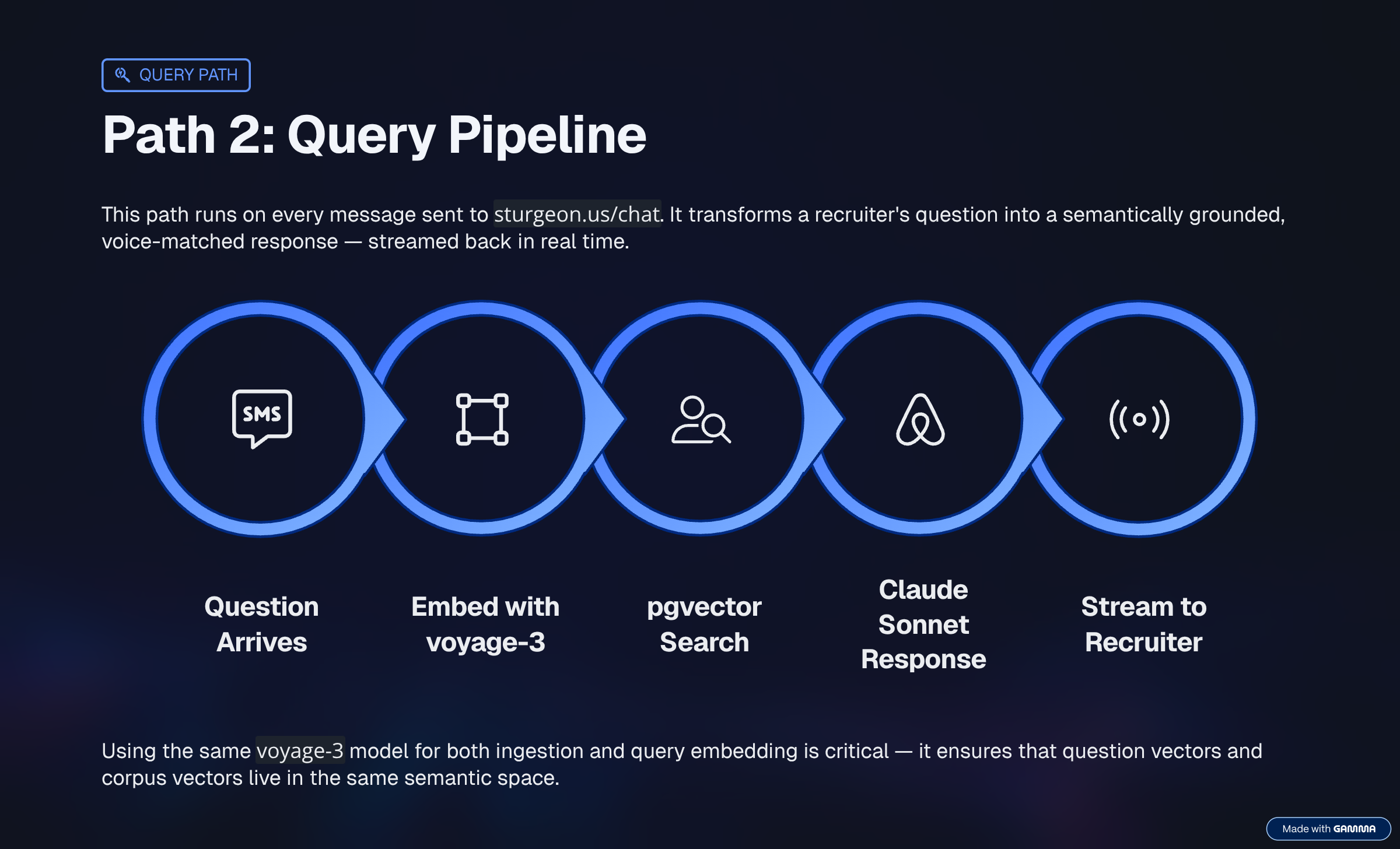
At query time, when someone types a question into sturgeon.us/chat:
- First we batch up the corpus documents, chunking them into smaller units, and vectorizing them.
- The question gets embedded into a vector using Voyage AI, the same embedding model used to process the corpus.
- That vector gets compared against every chunk in the database using cosine similarity.
- The top results above a configured threshold come back as context.
- Those chunks, plus the question, plus the conversation history, go to Claude Sonnet.
- Claude responds as me.
Two separate models, doing different jobs. Voyage AI (voyage-3) handles embedding: converting text into vectors so we can measure semantic similarity. Claude (claude-sonnet-4-6) handles generation: reading the retrieved context and producing a response in my voice.
Now let's break it down step by step.
Chunking and batching
- Chunks - Put simply, they are blocks of text. Let's talk about why they matter.
The corpus is a collection of markdown files: work history, management philosophy, job preferences, references, writing samples. The ingestion script walks the content/ folder, reads every file, and breaks it into chunks.
Chunk size is 600 characters. Small enough that a chunk represents one coherent idea, large enough to be useful when retrieved. At roughly 4 characters per token, that's about 150 tokens per chunk - below the point where a chunk starts carrying too many different ideas at once.
Batching started at 8 chunks per API call initially, while I was still on Voyage AI's free tier. Once I upgraded to Tier 1 (still free, just requires a payment method on file), the limits jumped to 6M tokens per minute and 4k requests per minute - more than I'll ever need. Batch size could then be increased to 128 and the ingest process went from slow and cautious to fast, for no extra cost.
One thing I got right early: smart re-ingest (caching, of a sort). Before embedding a file, the script computes a SHA-256 hash of its content and checks it against a stored hash. If the file hasn't changed, it skips it entirely. I was iterating on the corpus constantly - without this, every run would re-process everything. At my scale that's pennies, but the pattern matters at any scale.
Embeddings: Voyage AI, 1024 dimensions
- Vectors - Ordered lists of numbers that represent complex data. The simple visual is a directional line in 2- or 3-dimensional space, but vectors typically have hundreds or thousands of dimensions depending on the application.
Voyage AI's (voyage-3) model outputs 1024-dimensional vectors, which puts it squarely in the mainstream of modern embedding models. The dimension count controls how much semantic detail each vector can encode: higher means more expressive but slower and costlier; lower means faster but lossier. In practice, for a corpus of a few dozen markdown files, this barely matters. The retrieval quality levers that actually move the needle are chunking strategy, using asymmetric input types (query vs. document at embed time), and threshold tuning. You could drop to 384 dimensions on a corpus this size and likely never notice the difference.
The similarity threshold
- Cosine similarity - A measure of the angle between two vectors. Small angle means similar meaning, large angle means unrelated. This is the number we'll use to decide what context to pass to Claude. Two chunks about the same topic produce vectors pointing in similar directions. Unrelated chunks point different ways.
After running the search, the code filters results by cosine similarity. Only chunks above 0.65 pass. Everything below gets dropped. If nothing clears the bar, the query logs as a miss. This actually started at 0.5 and as the corpus grew more complicated I had to adjust this number upward to keep it relevant. This threshold is somewhat fluid as long as your corpus is growing. We'll need to keep an eye on how well the service works in practice and as the corpus changes we will likely need to tweak it so that the responses stay relevant.
Set it too low and you get false positives: vaguely related chunks that don't answer the question, which leads to hallucinated responses. Set it too high and you cut off legitimate matches. 0.65 felt right after testing across a range of questions, but it's not universal - the right number depends on your embedding model, your content, and what "related enough" means for your use case.
The code retrieves the top 6 chunks before applying the threshold filter. It always does the comparison work, but only passes useful context forward.
The missed queries loop
When nothing clears the threshold, the model either deflects generically or hallucinates a confident-sounding answer that's just wrong. Both are problems.
I ran into this early in testing. A recruiter asks about salary expectations - completely normal screening question - and the model came back with a generic deflection. Easy fix once I knew about it: I added a system prompt instruction to acknowledge salary questions directly and redirect to a real conversation. But the bigger concern was what happens when a recruiter hits a gap I don't know about.
So I built a feedback loop. When a query misses:
- The query gets written to a
missed_queriestable with its best similarity score. - I get an email with the exact question text.
It's not an alert that something broke. It's a signal that someone asked something the corpus can't answer well. Some are jailbreak attempts. Some are questions I've intentionally scoped out, like real-time market data. But some are genuine corpus gaps - things I'd never thought to document.
Every time I get one of those and fill the gap, the tool gets better. The missed_queries table has become as much a maintenance interface as a monitoring tool.
Conversation history
The last 10 messages get passed to Claude alongside the retrieved context and the new question. This is what makes follow-up questions work. Without it, every message is a fresh query with no memory of what came before - like talking to someone who forgets everything between sentences.
Ten messages covers a typical screening conversation. Beyond that, the context window fills up and older history matters less anyway.
The corpus growth arc
When I first ran the ingestion script, the corpus had 8 files and about 56 chunks. A week later it was up to 22 files and roughly 250 chunks.
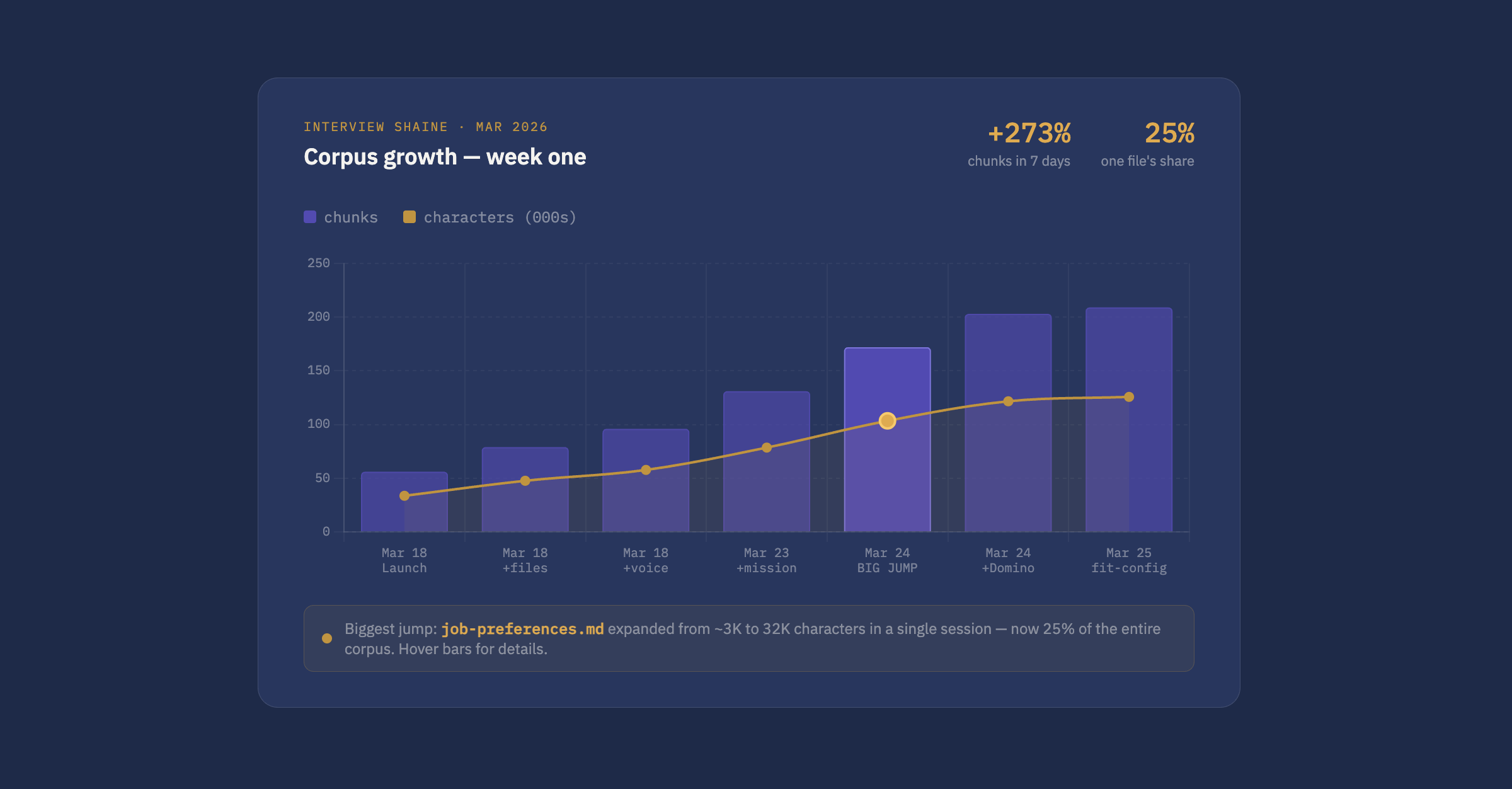
The live version of this chart — updated automatically after every ingest run — is at sturgeon.us/corpus.
The biggest single jump wasn't adding new files - it was rewriting one. job-preferences.md went from about 3,000 characters to over 32,000 in a single session and is now roughly 25% of the entire corpus. That file covers what I look for in a role: industry, domain, team dynamics, travel preferences, what's important and what isn't. None of that was in any resume. Through this tool, it's retrievable.
Corpus size matters less than coverage. 56 chunks of job titles and dates couldn't answer questions about what drives me. 250 chunks that include preferences, philosophy, and context can.
What I'd do differently
The chunk size could be more dynamic. Fixed 600-character chunks sometimes split mid-paragraph and mid-thought. Chunking by paragraph or semantic boundary would produce cleaner context. That improvement is tracked on the backlog.
I'd also add source tracking to retrieval results earlier. Right now I can see which files are contributing context in the logs, but it's not surfaced to the interface. Knowing which documents are retrieved most often - and which almost never come up - would help prioritize corpus work.
And voice and format constraints belong in v1. I added the no-markdown rule to the system prompt after noticing the model defaulting to bullet lists. Should have been there from the start.
What's next?
The most practical near-term improvement is a reranker. The current pipeline retrieves the top matching chunks and passes them directly to Claude. A reranker adds a second pass: after retrieval, it re-scores the candidates using a model specifically trained to judge relevance, then passes only the highest-quality chunks forward. Better context, less noise.
Longer term: fine-tuning the embedding model on domain-specific data, or RLHF (Reinforcement Learning from Human Feedback) -style feedback loops where good and bad responses train the retrieval ranking. Both are meaningful upgrades. The reranker is the one I'd tackle first.
This project has pointed out a real gap in how AI is being used on the hiring side. You can't get a complete picture of a candidate from a thin resume, and most resumes are thin by design. A CV, a curriculum vitae, is literally a path of work - an outline. What a system like this needs is a Corpus Vitae: a body of work that actually represents who the candidate is. Until we figure out how to collect and represent that, AI-assisted hiring will keep making decisions on incomplete data.
The JD Fit Analyzer runs on the same corpus but uses it differently: instead of answering questions, it grades a job description against my background across weighted categories. That post is next.
Try ShAIne: sturgeon.us/chat. Ask something you'd actually ask in a screening call.